Microsoft Fabric puts data engineering, warehousing and Power BI on one platform, and that is exactly why governance gets hard quickly. A finance lakehouse feeds a semantic model, which feeds a dozen reports, which get exported to Excel and emailed. When an auditor asks who can see customer data, or which reports depend on a table you want to change, the answer is often a spreadsheet someone last updated months ago.
Microsoft Purview and Fabric's own governance features can answer those questions for you. They only do it if you switch them on in the right order and give each one an owner. This post explains what each piece does, where Fabric ends and Purview begins, and a practical order for rolling it all out.
What Fabric does on its own, and what Purview adds
A good deal of governance is built into Fabric and included with your Fabric license:
- Domains to group workspaces by business area.
- Endorsement and tags to mark trusted, reusable items.
- Lineage and impact analysis to show how items depend on each other.
- The OneLake catalog, where people find data, with a Govern tab that shows governance status and recommends actions.
- Admin monitoring and the Capacity Metrics app for oversight.
Microsoft Purview adds the organization-wide layer. Microsoft lists these Purview integrations with Fabric today:
- Information Protection: sensitivity labels on Fabric items, plus protection policies that control access based on those labels.
- Data Loss Prevention (DLP): detects sensitive data uploaded to OneLake, and can restrict access to sensitive assets in Fabric Data Warehouse, SQL database and KQL databases.
- Audit: all Fabric user activity is logged in the Purview audit log.
- Unified Catalog: Fabric metadata alongside the rest of your data estate, with glossary terms and data products.
- Insider Risk Management: ready-made indicators for risky Power BI and lakehouse activity, such as exporting reports.
Microsoft notes that Information Protection, DLP and cross-organization Purview governance need additional licensing. Check that before you promise any of them to the business.
Domains and endorsement: ownership and trust
Start with ownership, because every other control needs someone accountable for it.
A domain in Fabric groups workspaces by business area, such as finance, HR or operations, and can be split into subdomains. Fabric admins create domains and appoint domain admins, ideally business owners who know the data and its regulations. Domain admins then approve domain contributors, the workspace admins who may assign their workspaces to that domain. A default domain can be set for specific users or groups, so their new workspaces land in the right domain automatically.
One detail matters for security reviews: domain assignment doesn't change who can see or open an item. Access still comes from workspace roles and item permissions. Domains organize and delegate. They don't secure.
Endorsement tells people which data to trust. Fabric has three badges:
- Promoted: the owner says the item is ready to share. Anyone with write permission can promote.
- Certified: an authorized reviewer confirms the item meets your quality standards. Only people a Fabric admin specifies can certify.
- Master data: the item is the authoritative source for core data, such as customer or product lists. It applies only to items that contain data.
Microsoft's guidance is to let domain admins handle certification, each with their own reviewers. That puts decisions about quality with the people who understand the data.
Sensitivity labels that follow the data
Sensitivity labels from Microsoft Purview Information Protection are the control most regulated organizations care about. Fabric supports them well, with some limits you need to know:
- Manual and programmatic labeling work on all Fabric items. Programmatic labeling uses admin REST APIs.
- Default labeling works on all Fabric items, with limitations for non-Power BI items created without a clear create dialog.
- Mandatory labeling is fully supported only for Power BI items today.
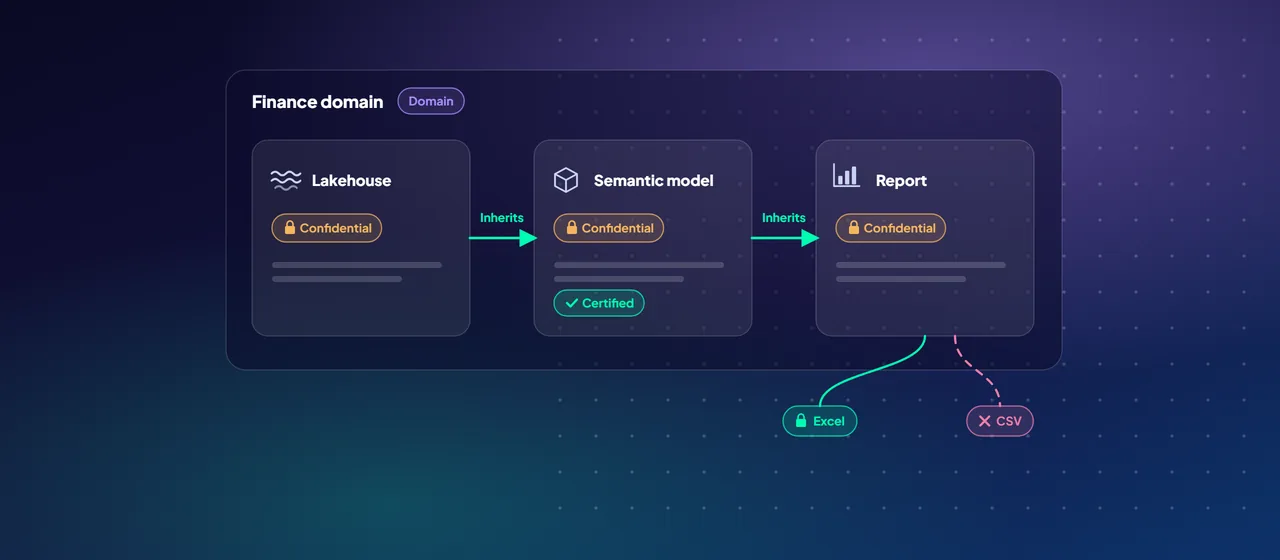
- Downstream inheritance is on by default. A label on a lakehouse flows to the semantic models and reports built on it. Inheritance works from Fabric items to Fabric items and from Fabric items to Power BI items, but not from Power BI items back to Fabric items.
- Inheritance from data sources currently applies only to Power BI semantic models.
- Export protection keeps the label, and any access control it applies, when Power BI content goes to Excel, PDF, PowerPoint or a .pbix file. Other export paths, such as .csv, aren't protected.
Protection policies go a step further. A policy tied to a label lets only named users and groups keep access to labeled items and blocks everyone else. Policies cover native Fabric items and Power BI semantic models, but not reports or dashboards. A new policy can take up to 24 hours to take effect, and policies don't support guest users.
Domain admins can also set a default sensitivity label for their domain. This is in preview, and it doesn't yet support deployment pipelines or Git integration.
- Downstream, on by default: lakehouse to semantic model to report
- Fabric items to Power BI items
- Exports to Excel, PDF, PowerPoint and .pbix
- From Power BI items back to Fabric items
- Other export paths, such as .csv
Catalog and lineage
Inside Fabric, every workspace has a lineage view. It shows how items connect, plus data sources one step upstream. For downstream items in other workspaces, use impact analysis before you change a table.
Across the whole estate, the Microsoft Purview Unified Catalog organizes data by governance domains. It publishes curated data products that people can request access to, and attaches glossary terms, data quality rules and health scores. It requires the enterprise version of Microsoft Purview.
There are two ways to get Fabric metadata into Purview:
- Live view, which is in preview, shows Fabric workspaces and items to people who already have access, without setting up a scan. It covers item-level metadata only.
- Scanning the Fabric tenant brings in metadata and lineage, and supports managed identity authentication. For non-Power BI items, Purview captures item-level metadata and lineage. For lakehouse tables and files it captures metadata but not lineage below the item level.
Microsoft adds a caution for scanning. Once metadata such as item names and owners is in Purview, Purview's permissions decide who can see it, not Fabric's. Plan your Purview roles before the first scan.
A practical rollout order
This order builds each control on the one before it:
- Agree domains and owners. Map domains to business units, name a domain admin for each, and assign existing workspaces.
- Publish a label taxonomy. Define sensitivity labels and label policies at the organization level in Purview, then enable labels in the Fabric admin portal for the right users.
- Turn on default labeling and check inheritance. Use the OneLake catalog's Govern tab to find unlabeled items and fix the biggest gaps first.
- Set up certification per domain. Name reviewers, write down what "certified" means, and certify the first gold-layer items and semantic models.
- Add DLP and protection policies for your most sensitive labels. Start with alerts and policy tips before you block access.
- Connect the Unified Catalog. Register and scan the Fabric tenant, then publish a few data products with glossary terms for high-demand data.
- Review monthly. Track label coverage, endorsement and DLP findings on the Govern tab, and check the Purview audit log for unusual access.
Resist the urge to do everything at once. Steps 1 to 3 give you ownership and label coverage you can measure. The catalog work pays off once there's trusted, labeled data to publish.
Where to start
Start with a governance assessment of your Fabric tenant. List your workspaces, check label coverage and endorsement on the Govern tab, confirm your Purview licensing, and agree a domain model with business owners. Then pilot the rollout order in one domain before extending it. CloudGate runs these assessments and pilots for Fabric customers.
Talk to an architect