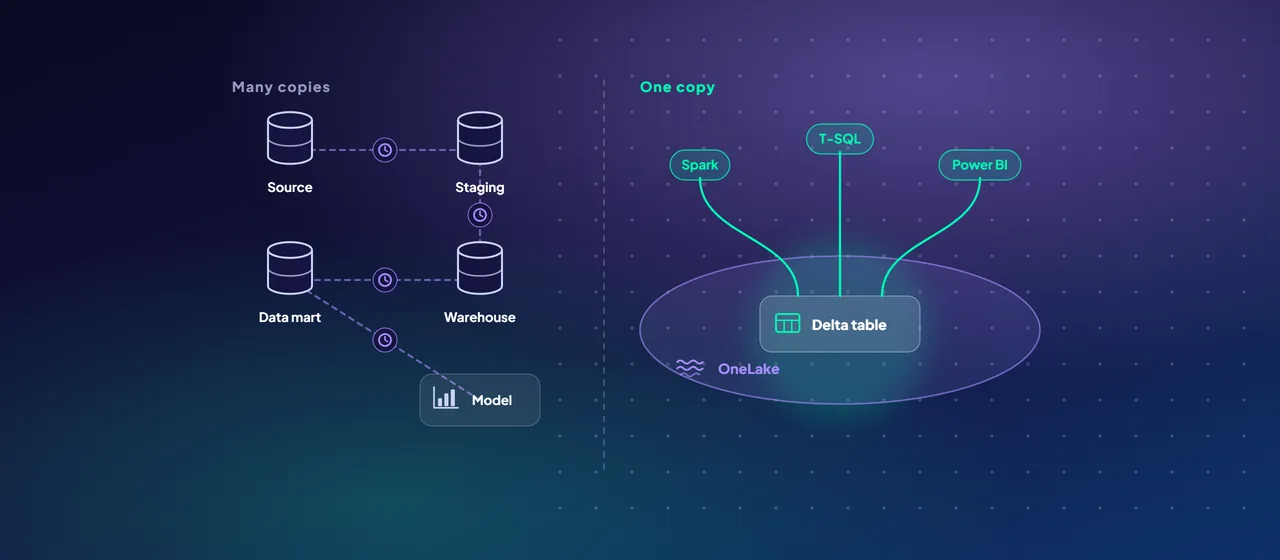
Most enterprise data warehouses follow the same shape. Data is extracted from source systems into a staging database, transformed into a warehouse, copied again into data marts or cubes, and imported once more into reporting models. Each step is a copy, each copy has its own refresh schedule, and each schedule is a place where things go stale or break.
Microsoft Fabric is often described as "a data warehouse in the cloud". That undersells the change. The warehouse concepts survive, but the plumbing around them is different. This post is for architects and data leaders who want to know what actually shifts, and what does not, before planning a move.
From many copies to one copy in OneLake
In a traditional stack, storage belongs to each engine. The warehouse has its own files, the Spark platform has its own lake, and the reporting tool keeps its own compressed copy. Moving data between engines means exporting and loading it.
Fabric reverses this. Every workload stores data in OneLake, a single logical data lake per tenant, built on Azure Data Lake Storage Gen2. Tables are stored in the open Delta Lake format (Parquet files plus a transaction log). The practical effect:
- A table written by a Spark notebook in a lakehouse can be queried with T-SQL through the lakehouse's SQL analytics endpoint, and read by Power BI, without being copied.
- Fabric Data Warehouse separates compute from storage and stores its tables in Delta Lake format too, so warehouse tables are readable by the other engines.
- By default, every Fabric engine writes Delta tables when it creates a new table, which keeps the format consistent across teams.
The mental model changes from "which system holds this data" to "which engine should I use on this data".
From ingestion pipelines to shortcuts and mirroring
The second shift is how data arrives. A classic warehouse needs a pipeline for every source. Fabric still has pipelines (Data Factory, with more than 200 connectors), but two features remove many of them:
- Shortcuts are pointers in OneLake to data stored elsewhere, in another Fabric item, Azure Data Lake Storage Gen2, Azure Blob Storage, Amazon S3, S3-compatible storage, Google Cloud Storage or Dataverse. They behave like symbolic links: the data stays where it is, and Fabric engines read it as if it were local. For cross-cloud sources, shortcut caching can reduce egress costs.
- Mirroring continuously replicates databases, such as Azure SQL Database, SQL Server, Oracle, Snowflake and Azure Cosmos DB, into OneLake as Delta tables, in near real time. Microsoft describes it as a zero-ETL approach: you choose tables, and Fabric keeps them in sync.
Neither removes the need for transformation. You still clean, conform and model data. What goes away is the undifferentiated work of landing raw copies.
From import refresh to Direct Lake
In most warehouse projects, the reporting layer is a separate copy. Power BI import models load the data on a schedule, and large models can take hours to refresh and a lot of capacity to do it.
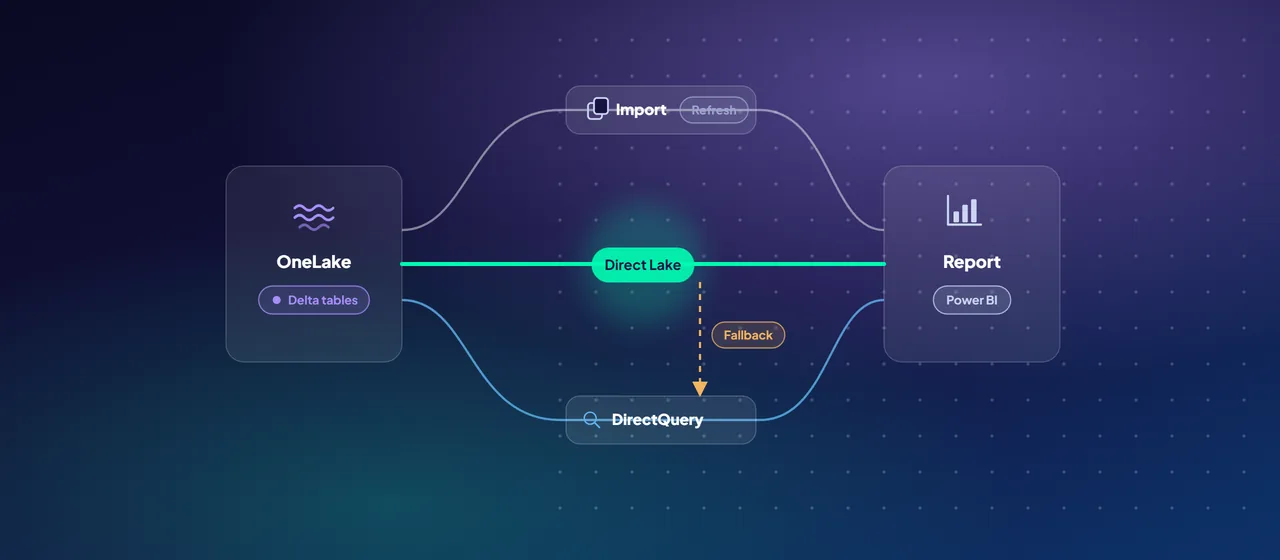
Direct Lake is a Power BI storage mode that reads Delta tables from OneLake straight into memory when a query needs them. A Direct Lake "refresh" (called framing) copies only metadata, pointing the model at the latest version of the Delta tables, and Microsoft notes it can take a few seconds. Query performance is comparable to import mode because both use the same VertiPaq engine.
There are two variants. Direct Lake on OneLake can combine tables from several Fabric sources and does not fall back to DirectQuery. Direct Lake on SQL uses a single source's SQL analytics endpoint and can fall back to the slower DirectQuery mode, for example when a table is a SQL view or when guardrails are exceeded.
Those guardrails matter. Each capacity size limits the rows per table and the files per table that Direct Lake will load, so gold-layer tables need to be well maintained. Direct Lake also moves data preparation upstream into the lake, which is a design choice, not just a setting.
From servers to shared capacity
A traditional warehouse is sized as infrastructure: nodes, cores, storage tiers. Fabric is sized as a capacity, measured in capacity units (CUs), from F2 upward. All workloads, including Spark, SQL, pipelines and Power BI, draw from the same pool.
Three behaviors are new for most teams:
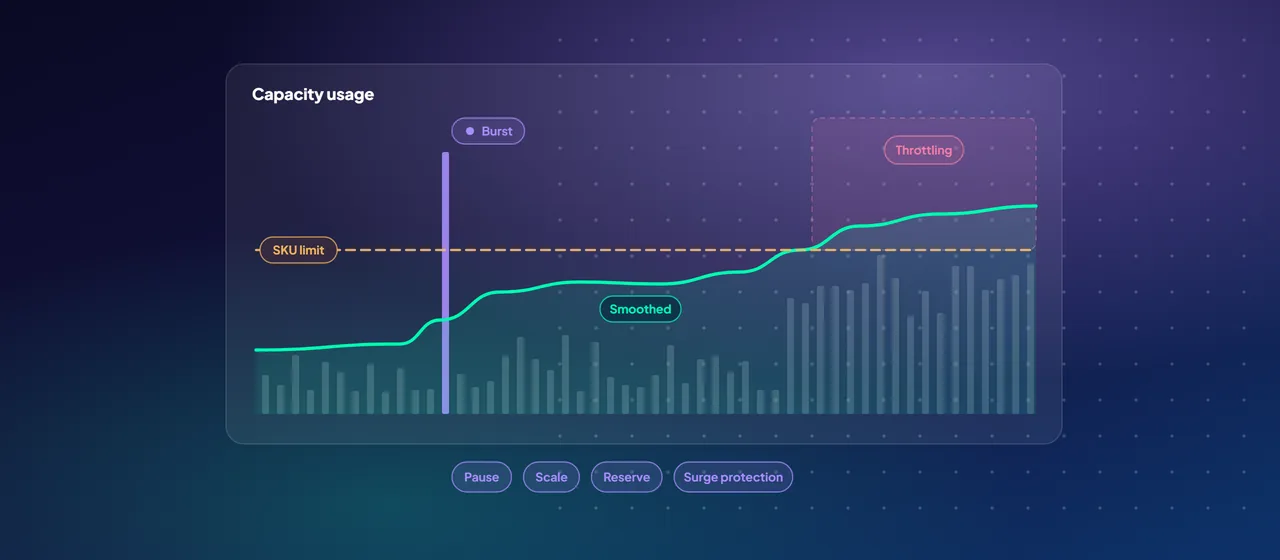
- Bursting. Operations can briefly use more compute than the capacity provides, so a large job finishes faster.
- Smoothing. Fabric spreads the cost of that usage over time: interactive operations over at least five minutes, and background operations, such as most warehouse activity, over 24 hours.
- Throttling. If a capacity consumes too much future capacity, Fabric first delays new interactive requests, then rejects them, and only after a full 24 hours of overuse rejects background jobs too.
F capacities are billed per second in Azure and can be scaled or paused. Capacity planning becomes a question of workload mix and monitoring (the Fabric Capacity Metrics app) rather than hardware.
What stays the same
Plenty does not change, and projects that forget this tend to struggle:
- Dimensional modeling still matters. Star schemas, conformed dimensions and clear grain make Direct Lake models fast and understandable. Microsoft recommends Direct Lake for the gold layer of a medallion architecture, where data is already curated.
- T-SQL still works. Fabric Data Warehouse and SQL analytics endpoints use T-SQL, and cross-database queries can join warehouses, lakehouses and mirrored databases.
- Data quality is still your job. One copy of bad data is still bad data.
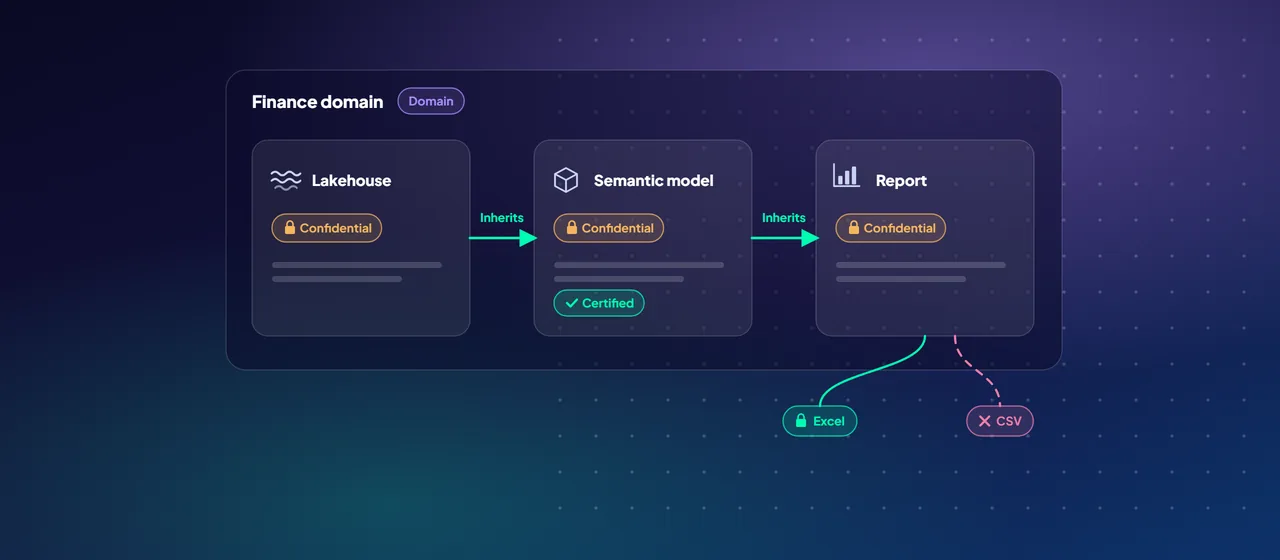
- Ownership and definitions still need a decision. Someone must own "revenue" and "customer". Fabric makes one definition possible. It does not choose it for you.
- Import mode still has a place. Microsoft notes import models remain the right choice for some self-service scenarios.
Decisions to make before you migrate
- Which workloads stay in the existing warehouse for now, and which move first?
- Lakehouse, warehouse or both for each layer? Microsoft's guidance allows all lakehouses, or lakehouses for bronze and silver with a warehouse for gold.
- Which sources can be mirrored or shortcut instead of copied?
- Which reports should move to Direct Lake, and do their tables fit the guardrails for your capacity size?
- How many capacities, and how will you separate development from production workloads?
Where to start
Pick one subject area, such as finance reporting, and map every copy it passes through today, from source to report. Then run an architecture assessment that designs the same flow on Fabric and sizes the capacity against real workloads. CloudGate runs these assessments for organizations modernizing their data warehouse.
Talk to an architect