A security operations center (SOC) in the Middle East faces the same problems as any SOC, plus a few of its own. Ingestion costs grow faster than budgets. Analysts spend their shifts on repetitive triage. Regulators and internal risk teams want to know exactly where security logs are stored and processed.
Microsoft Sentinel, Microsoft's cloud-native SIEM (security information and event management) and SOAR (security orchestration, automation and response) platform, can handle all three. But only if you design for them from the start. This post covers the decisions that matter most: how data gets in, how detections work, where Sentinel now lives, which cost levers you have, how to automate, and what data residency really means.
Sentinel now lives in the Defender portal
The biggest platform change is where you use Sentinel. It's generally available in the Microsoft Defender portal, including for customers without Microsoft Defender XDR or an E5 license. Microsoft has announced that after March 31, 2027, Sentinel will no longer be supported in the Azure portal.
In the Defender portal, Sentinel and Defender XDR share one incident queue, one advanced hunting experience, and correlation across SIEM and XDR alerts. There are side effects you need to plan for. Once you onboard, Microsoft security incident creation rules and the Fusion multistage attack rule are disabled, because Defender XDR creates the incidents instead. Automation also behaves differently, as described below. If you're still in the Azure portal, plan the move as a project with testing, not a switch you flip.
Getting data in: connectors and ASIM
Most sources connect through solutions from the Content hub, which bundle a data connector with analytics rules, workbooks and playbooks. The main connection methods are:
- Service-to-service connectors for Microsoft services and AWS.
- Azure Monitor Agent (AMA) for Windows Security Events, and for Syslog and CEF (Common Event Format) through a Linux log forwarder. That covers most firewalls and network appliances.
- Codeless Connector Framework and the Logs Ingestion API for custom and SaaS sources. Microsoft's support for the legacy HTTP Data Collector API ended after September 14, 2026. Check that no integration still depends on it.
A regional SOC often monitors a mix of vendors that changes over time. The Advanced Security Information Model (ASIM) helps here. It defines normalized schemas for authentication, network sessions, DNS, process events, web sessions and more. Query-time parsers map each source onto those schemas. Detections written against ASIM then work on any supported source, including one you add next year. For large volumes, ingest-time normalization writes data straight into normalized tables so queries run faster.
Detections that fit your threats
Sentinel's analytics rules include:
- Scheduled rules, which are KQL (Kusto Query Language) queries on a schedule.
- Near-real-time rules, which run every minute.
- Anomaly rules, which build baselines and record deviations.
- The Microsoft Threat Intelligence matching rule.
- ML behavior analytics rules for unusual SSH and RDP sign-ins. These are still in preview.
Microsoft now recommends custom detections in the Defender portal as the preferred way to build new rules across Sentinel and Defender XDR.
Start from templates, not a blank page. Enable only rules tied to threats you care about and data you actually collect. Tune them in the first weeks. Export rules to ARM templates so they're managed as code. A small set of well-tuned rules beats hundreds of noisy ones.
Cost levers that actually move the bill
Sentinel pricing depends on which tier your data goes into. These levers matter most:
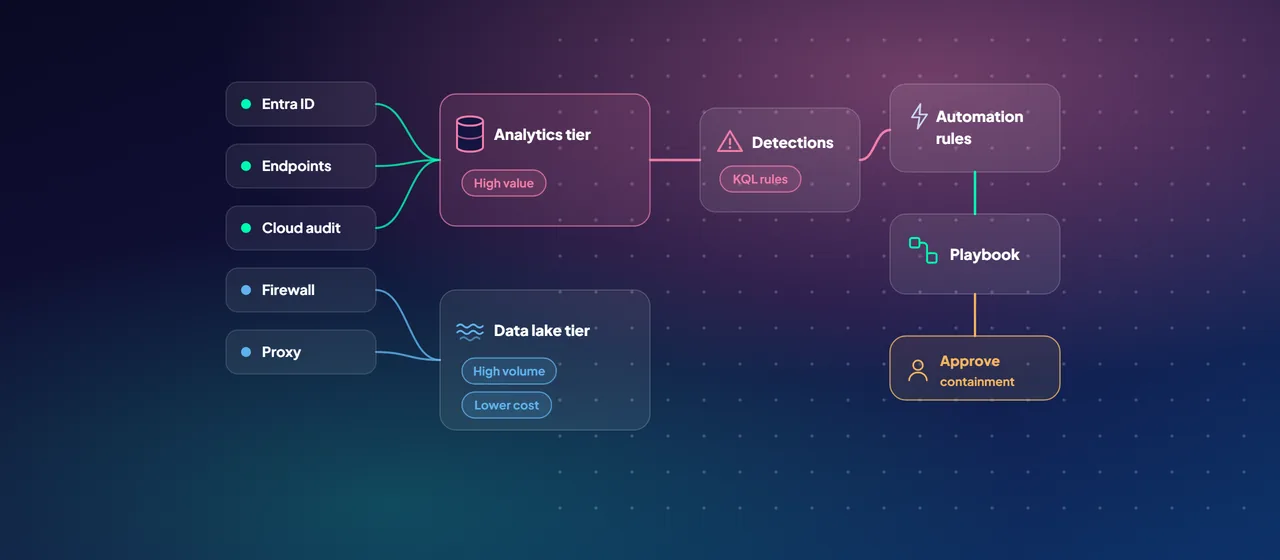
- Split primary and secondary data. Microsoft recommends sending high-value security data to the analytics tier. That includes EDR, authentication, cloud audit logs and threat intelligence. High-volume, lower-value logs such as firewall, proxy, NetFlow and storage access logs belong in the Sentinel data lake tier. The data lake tier costs much less to store, and you pay separately when you query it.
- Right-size retention. The analytics tier includes 90 days of retention, which you can extend to two years. The data lake keeps data for up to 12 years for investigations and audits.
- Use commitment tiers. Analytics tier commitment tiers start at 100 GB per day and cost less per GB than pay-as-you-go. You can raise a tier at any time. You can only lower it after the 31-day commitment period. You can also pre-purchase commit units for a year.
- Use the free data. Azure Activity logs, Office 365 audit logs, and alerts from the Defender products are free to ingest. Microsoft 365 E5, A5, F5 and G5 customers (and their Security equivalents) get a data grant of up to 5 MB per user per day for Microsoft 365 data, according to Microsoft's offer page.
- Filter at the source. Data collection rules on the Azure Monitor Agent let you collect only the Windows events you need.
- Keep non-security data out. Operational logs belong in a separate workspace, where they don't incur Sentinel charges. If you ingest 100 GB or more per day across workspaces in one region, look at a Log Analytics dedicated cluster.
- EDR, authentication, cloud audit logs, threat intelligence
- 90 days included, extendable to two years
- Firewall, proxy, NetFlow and storage access logs
- Much cheaper to store; you pay when you query
- Keeps data for up to 12 years
Automation: rules first, then playbooks
Sentinel has two automation layers. Automation rules tag, assign and close incidents, add analyst task lists, and trigger playbooks, all without code. Playbooks are Azure Logic Apps workflows for enrichment, ticketing, notifications and containment.
A sensible order:
- Use automation rules to route incidents to the right queue and close known benign patterns.
- Add enrichment playbooks, such as IP and domain reputation, user details, and asset owner.
- Connect your ticketing system.
- Add containment, such as disabling a user or isolating a device, with an approval step for high-impact actions.
In the Defender portal, note Microsoft's documented differences. An automation rule can take up to 10 minutes to run after an incident is created or updated. Incident titles can change because of correlation, so don't use them as conditions. Running playbooks manually on alerts or entities isn't currently supported there.
Data residency: read the fine print
Sentinel stores its data in the region of its Log Analytics workspace. Sentinel SIEM supports UAE North, UAE Central and Qatar Central. Two details matter for regional SOCs:
- Processing location. Microsoft states that for workspaces outside Europe and Israel, Sentinel processes customer data in a US region. Onboarding to the Defender portal can also involve processing in Defender XDR regions. Storage location stays the same.
- Data lake regions. Microsoft's current list of data lake regions doesn't include the UAE or Qatar, and the lake must be in the same region as the primary workspace. A UAE-hosted workspace therefore can't use the data lake tier today. Check this list before you design your tiering. Also note that you can't purge specific records from the data lake.
Take these facts to your compliance and legal teams early, and document the decision.
Where to start
Start with a Sentinel design or optimization review. Map your log sources to primary and secondary data, check residency against your obligations, size a commitment tier, and plan the Defender portal move before the March 2027 deadline. CloudGate runs these reviews for SOC teams in the region.
Talk to an architect