Application portfolios rarely get one decision. A bank or ministry might run a few hundred applications: some modern, some fifteen years old, some that nobody has opened in years. Treating them all the same way, whether "lift everything as-is" or "rewrite everything cloud-native", wastes money in one direction or time in the other.
The better question is per workload: what does this application need to change, and what is the cheapest move that delivers it? Microsoft's Cloud Adoption Framework (CAF) gives a vocabulary for that decision, and Azure's tooling now does much of the analysis. This post covers both.
Eight options, not three
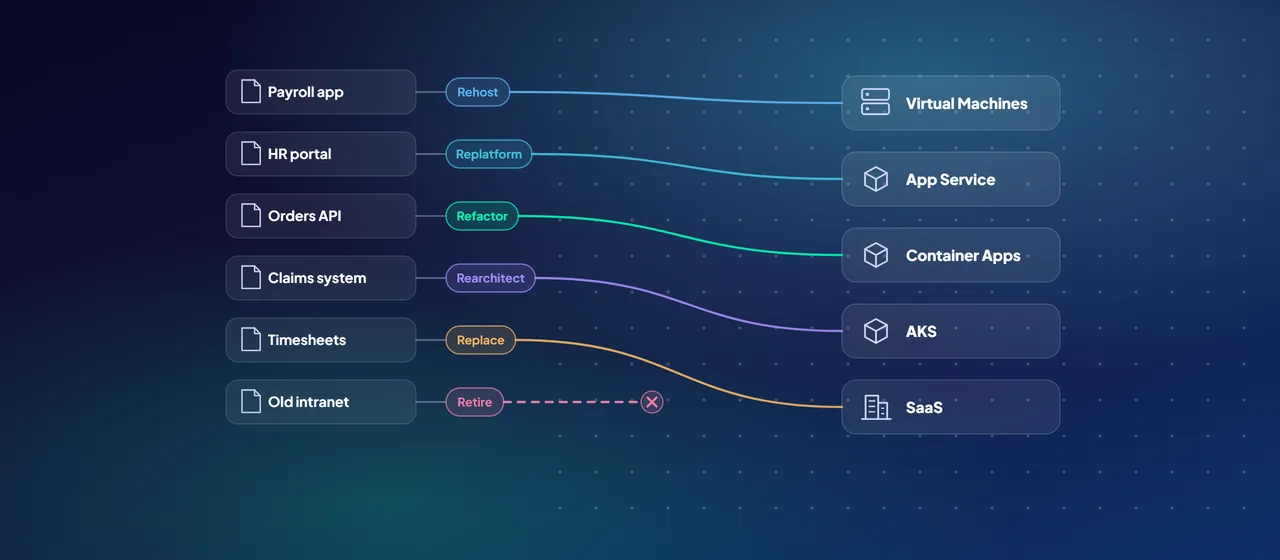
CAF lists eight migration strategies, sometimes called the "Rs". Each one starts from a business driver, not a technology preference:
- Retire: decommission workloads with little business value, where moving them costs more than they are worth.
- Retain: keep a stable, compliant workload where it is. Azure Arc lets you manage it from Azure anyway.
- Rehost: a like-for-like move, for example on-premises servers to Azure Virtual Machines. Fast and low risk.
- Replatform: move to a managed platform with minimal code changes, such as a VM-hosted web app to Azure App Service or SQL Server to Azure SQL Database.
- Refactor: change the code, without adding features, to cut technical debt and use cloud services and SDKs properly.
- Rearchitect: change the architecture itself, for example breaking a monolith into services that scale separately.
- Rebuild: redevelop the workload as a new cloud-native solution when the legacy system is too outdated to modernize.
- Replace: swap custom software for a SaaS product when little customization is needed.
Two pieces of CAF guidance are worth taking literally. First, don't rehost a problematic workload: moving it keeps its performance and reliability issues and adds rework later. Second, only rehost when you are confident the workload won't need modernizing for at least two years. If it will, modernize now and do the work once.
Let the assessment make the first cut
Opinions about applications are cheap. Azure Migrate gives you data. It is a free Microsoft service (partner tools used through it may charge) that covers discovery, assessment and migration of servers, databases and web apps.
- Discovery: a lightweight appliance in your datacenter continuously collects configuration and performance data. For air-gapped or restricted networks, the Azure Migrate Collector takes a one-off snapshot instead.
- Business case: estimates on-premises versus Azure total cost of ownership and year-over-year cash flow.
- Assessments: check readiness, right-size Azure targets and estimate cost. Web app assessments recommend Azure App Service or Azure Kubernetes Service (AKS) for discovered ASP.NET and Java apps.
- Dependency analysis: maps network dependencies between servers, so you don't move half of an application and break the other half.
Azure Migrate also includes the Azure Copilot migration agent, in preview, which lets you query your discovery and assessment data conversationally and compare strategies.
Use the dependency map to form migration groups. CAF recommends moving directly dependent components together, starting with simpler, lower-risk workloads, and migrating non-production environments before production.
Picking a hosting target: App Service, Container Apps or AKS
For replatformed or refactored web apps and APIs, three Azure services cover most cases. Microsoft's compute decision guide frames the choice around control versus operational effort.
- Azure App Service is a managed platform for web apps and APIs, running code or containers. Operational overhead is low and deployment slots support safe releases. It suits teams that want to focus on application code.
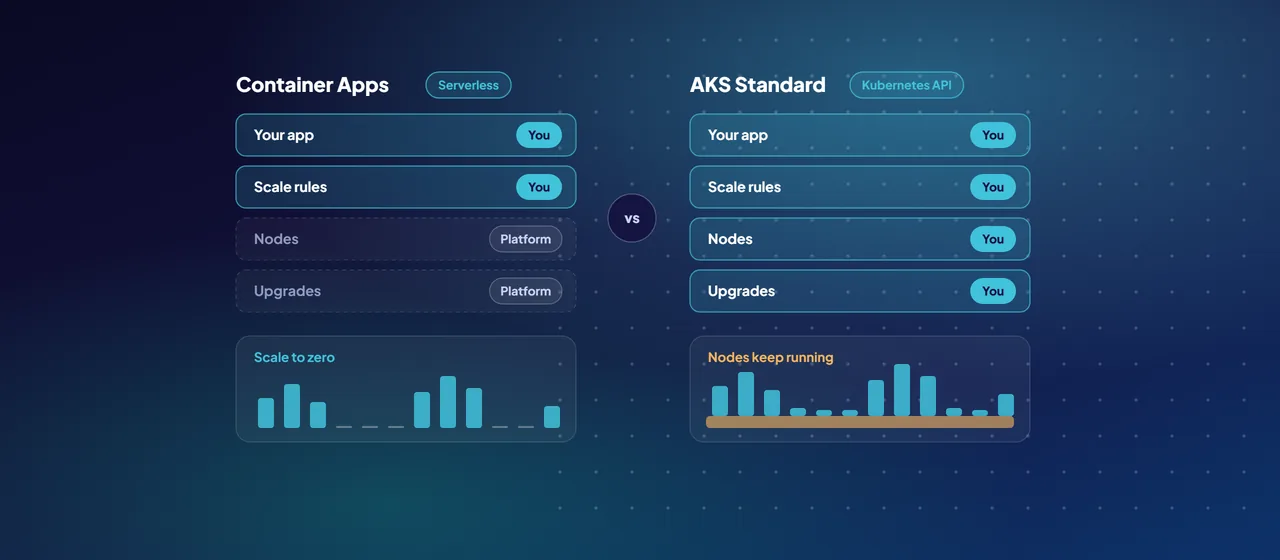
- Azure Container Apps is a serverless container platform built on Kubernetes that hides the Kubernetes APIs. It offers scaling rules, revision management and low overhead. It suits teams that want microservices and event-driven patterns without running a cluster.
- AKS gives you direct access to the Kubernetes API and control plane. It is the right choice when you need that control, and Microsoft rates its operational overhead as high: you own cluster upgrades, security and management.
A simple rule: start at App Service, move to Container Apps when you have multiple containerized services, and choose AKS only when you have a specific need for Kubernetes itself and a team to run it.
Where GitHub Copilot fits in .NET modernization
Code changes are usually the slowest part of replatforming or refactoring. Microsoft now ships agentic tooling for this under the name GitHub Copilot modernization (you will also see the earlier name, GitHub Copilot app modernization). It runs in Visual Studio, Visual Studio Code, GitHub Copilot CLI and on GitHub.com. For .NET, the work is split between two agents:
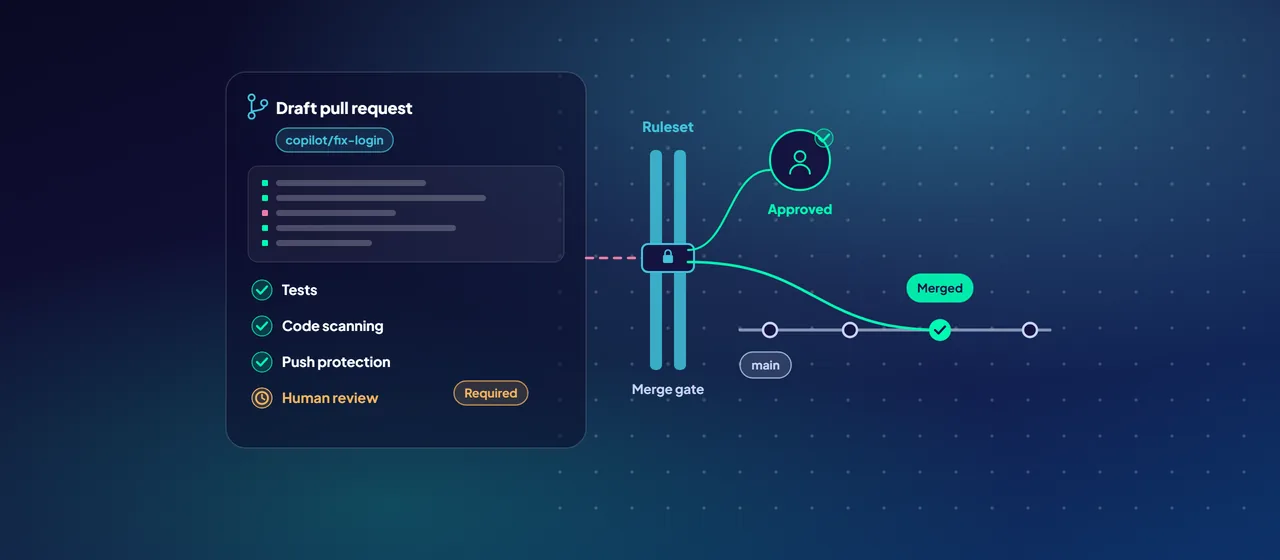
- GitHub Copilot upgrade moves projects to newer .NET versions, including .NET Framework to .NET 8 or later. It assesses the solution, writes a plan you can edit, then executes it task by task in a Git branch, committing each step so you can review or roll back. Scenarios include SDK-style project conversion, Azure Functions in-process to isolated worker, and ASP.NET Web Forms to Blazor.
- GitHub Copilot modernization handles Azure migration. It assesses Azure readiness and applies predefined tasks for common changes: moving database access to managed identity with Azure SQL or Azure Database for PostgreSQL, replacing plaintext credentials with managed identity and Azure Key Vault, moving from Windows Active Directory to Microsoft Entra ID, replacing MSMQ or RabbitMQ with Azure Service Bus, and moving local file I/O to Azure Blob Storage or Azure Files. It can also containerize the app, generate infrastructure as code and deploy.
The IDE experiences for upgrades and for .NET and Java migration scenarios are generally available. The separate modernization agent, delivered through the Modernize CLI for assessing and planning across many applications at once, is in public preview.
Keep humans in the loop. Microsoft's own FAQ notes that upgrade suggestions aren't guaranteed to follow best practices, so treat every change as a pull request to review and test.
A per-workload decision sequence
Run each application through the same questions, in this order:
- Does it still earn its keep? If not, retire it. This is the cheapest migration there is.
- Is there a SaaS product that does the job with little customization? If so, replace it.
- Must it stay put for regulatory, technical or continuity reasons? Retain it, and manage it with Azure Arc.
- Is it stable, and will it stay unchanged for two years or more? Rehost it.
- Would a managed platform remove patching and licensing work with modest code changes? Replatform it to App Service or Container Apps.
- Is technical debt or an unsupported framework the real problem? Refactor, using GitHub Copilot upgrade and modernization to speed up the code changes.
- Does the architecture block scaling or new features? Rearchitect, or rebuild if the legacy code isn't worth saving.
CAF adds a timing check: modernize during migration only when the team has the skills and time, or when the migration project is what unlocks the funding. Otherwise, migrate first and modernize in a later wave.
- Does it no longer earn its keep?Retire
- Does a SaaS product do the job with little customization?Replace
- Must it stay put for regulatory, technical or continuity reasons?Retain
- Is it stable, and unchanged for two years or more?Rehost
- Would a managed platform remove patching and licensing work with modest code changes?Replatform
- Is technical debt or an unsupported framework the real problem?Refactor
- Does the architecture block scaling or new features?Rearchitect or rebuild
Where to start
Start with an assessment, not a strategy document. Deploy the Azure Migrate appliance, let it gather performance and dependency data, and build a business case for one application group. Then pick one .NET application as a pilot, run it through the decision sequence, and use GitHub Copilot upgrade and modernization on a branch to see what the code changes really look like. CloudGate runs these assessments and pilots if you want support.
Talk to an architect