Developers adopted AI coding assistants faster than most security teams could write a policy. And the tools now do more than suggest the next line. They edit many files at once, run terminal commands and open pull requests on their own.
That raises fair questions for a CIO or CISO. What code leaves the organization? Who approved a given change? How do you stop an AI-written commit from leaking a secret or introducing a vulnerability? This post explains how GitHub Copilot works in the enterprise, and the controls that answer those questions.
Copilot in the IDE and in the cloud
GitHub Copilot now works in three main ways:
- Inline suggestions complete code as the developer types.
- Agent mode in the IDE takes a task in plain language, decides which files to change, makes the edits and runs commands. In Visual Studio Code, terminal commands need the developer's approval by default, and developers can set how much the agent may do without asking.
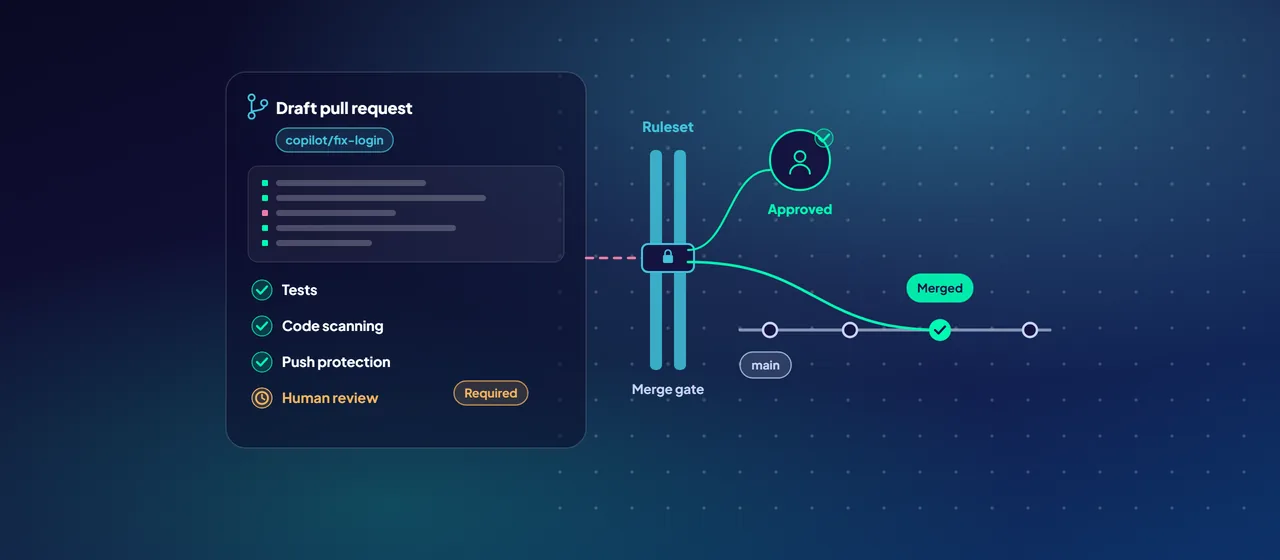
- Copilot cloud agent, previously called the Copilot coding agent, works on GitHub itself. You assign it an issue or ask for a change. It works in a temporary environment powered by GitHub Actions and opens a draft pull request for review. It is available on all paid Copilot plans. On Copilot Business and Copilot Enterprise, an administrator must first enable it by policy.
The cloud agent has limits built in. Only users with write access to the repository can trigger it. It can only push to a branch it created (named copilot/...) or to the pull request it was asked to work on. It can't mark its pull requests as ready for review, approve them or merge them, and the person who asked for the change can't approve that pull request. GitHub Actions workflows don't run on its code until someone with write access approves them. GitHub also restricts its access to the internet.
What data is sent, and what happens to it
For inline suggestions, Copilot sends the code around the cursor plus context such as snippets from other open tabs. Chat and agent mode send the prompt plus the files and context the agent works with.
For Copilot Business and Copilot Enterprise, GitHub states that its customer agreements prohibit using Copilot interaction data for model training. Individual plans are different. Since April 24, 2026, GitHub may use interaction data from Copilot Free, Pro and Pro+ users to train models unless they opt out. That is a strong reason to move developers onto organization-managed seats and away from personal accounts.
Retention varies by feature and is published in the GitHub Copilot Trust Center. Check it for each feature you enable, and watch for changes. For example, GitHub has announced that from September 28, 2026, Copilot Chat on github.com and the cloud agent move to one experience, and retention of that chat data extends from 28 days to the life of the account.
Two more controls matter:
- Content exclusion lets repository admins and organization owners stop Copilot from using specific files or paths. It has limits. It isn't currently supported in the Edit and Agent modes of Copilot Chat in Visual Studio Code and other editors, and the IDE may still pass on indirect information such as type definitions. Don't rely on it to protect secrets.
- Public code matching can block suggestions that match public code, or show them with repository and license details.
Policies: decide what's allowed, centrally
Copilot policies control which features, agents and models your users can access. In an enterprise account, owners can enable or disable each policy for everyone, or let each organization decide. For the cloud agent, enterprise owners choose exactly which organizations get access. Policies cover agents, models, privacy and Model Context Protocol (MCP) servers, which connect agents to external tools and data.
Sensible defaults for a regulated organization:
- Give Copilot only through organization-managed seats.
- Allow only the models your risk team has reviewed. Models beyond the basic set can also add cost.
- Enable the cloud agent for one pilot organization first, not the whole enterprise.
- Allow only approved MCP servers.
- Use the audit log to monitor changes to policy settings.
Rulesets and branch protection: the merge gate
AI makes writing code cheap. The merge gate is where you keep quality and accountability. Repository rulesets, and organization-wide rulesets on GitHub Team and Enterprise plans, let you apply the same rules across many repositories. Several rulesets can apply to one branch, and the most restrictive rule wins.
Rules worth enforcing on default and release branches:
- Require a pull request before merging, with at least one human approval.
- Require status checks to pass, including your test suite.
- Require code scanning results, so merges are blocked when alerts above a chosen severity are open.
- Require signed commits and block force pushes.
- Keep the bypass list short, and review it regularly.
Together with the cloud agent's own limits, this means AI-written code reaches your main branch only after a person has reviewed and approved it.
One catch: the cloud agent can't comply with some rules, such as a rule that only allows specific commit authors. Test your rulesets with the agent in a pilot repository before a wider rollout.
- 1Assign
Give the cloud agent an issue, or ask for a change.
- 2Agent works
In a temporary environment, pushing only to its own copilot/ branch.
- 3Draft PR
The agent can't approve or merge it, and the requester can't approve it.
- 4Merge gate
Rulesets require human approval, passing checks and code scanning.
GitHub Advanced Security: catch what review misses
GitHub Advanced Security is now offered as two products for GitHub Team and Enterprise plans.
GitHub Secret Protection includes secret scanning to find keys and tokens already in your repositories, push protection to block commits that contain secrets before they land, AI detection of unstructured secrets such as passwords, and custom patterns for your own credential formats.
GitHub Code Security includes code scanning with CodeQL or third-party tools, Copilot Autofix, which generates suggested fixes for code scanning alerts, dependency review for risky package changes, and security campaigns to work down existing security debt.
Push protection matters more once agents write code. An agent can copy a credential from a configuration file into new code without anyone noticing. With push protection on, that push is blocked.
Identity: tie every commit to a managed account
With Enterprise Managed Users, your identity provider controls GitHub accounts, including usernames, profiles, organization membership and repository access. Microsoft Entra ID is a partner identity provider, supporting SAML or OIDC sign-in and SCIM provisioning. With OIDC, GitHub also validates your Entra Conditional Access policies. Managed accounts can't create public content, which reduces the risk of internal code appearing in public repositories.
This closes the loop. Every Copilot seat belongs to a managed identity, access ends when someone leaves, and every commit from the cloud agent lists the developer who asked for it as co-author.
Where to start
Start with a short governance review of your GitHub estate. List who uses Copilot and on which plans, check your rulesets and bypass lists, and turn on secret scanning and push protection. Then pilot the cloud agent in one organization with the controls above in place. CloudGate helps organizations set up GitHub Enterprise with Entra ID, rulesets and GitHub Advanced Security.
Talk to an architect