Most organizations now have a list of processes that someone wants "an agent" for. HR wants one for policy questions. IT wants one for access requests. Finance wants one that answers "where is my invoice?" The list grows faster than anyone can build.
Copilot Studio, Microsoft's low-code tool for building agents, makes the first build quick. The hard part is building the right first agent, connected to the right data, under controls your security team will accept. This post covers knowledge, tools and topics, the governance to set before makers start, and how to pick a first use case.
Knowledge: ground answers in your content
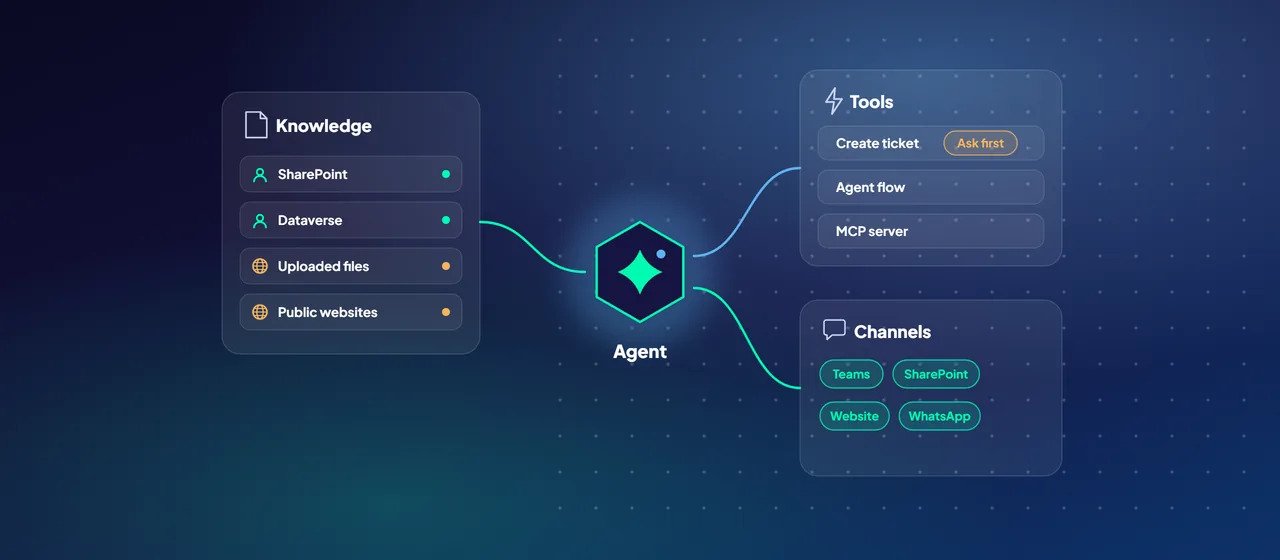
Copilot Studio supports several knowledge sources: public websites, uploaded documents, SharePoint, Dataverse, and enterprise data indexed through Microsoft Copilot connectors.
The permission model differs by source, and this is the first thing to check. For SharePoint, Dataverse and connector sources, the agent uses the signed-in user's Microsoft Entra ID authentication, so it only surfaces content that user can already open. Uploaded files and public websites have no per-user check. Anyone who can chat with the agent can get answers drawn from them. Don't upload a document to an agent unless everyone in its audience may read it.
Three settings deserve a deliberate decision:
- Allow ungrounded responses. When this is off, the agent blocks any reply in a turn where it didn't use a knowledge source or tool. Microsoft notes this doesn't fully stop the model from mixing in general knowledge, but it removes answers that come from nowhere.
- Use information from the web. This searches all public websites indexed by Bing, in addition to the sites you list. That may suit a general assistant. For an internal policy agent, it usually doesn't.
- Content moderation. The level runs from Lowest to Highest, and the default is High. Lower levels produce more answers but let more potentially harmful content through.
The agent uses the signed-in user's Microsoft Entra ID authentication, so it only surfaces content that user can already open.
Anyone who can chat with the agent can get answers drawn from them.
Tools: let the agent act
Tools turn an agent from a question-answering service into something that does work. You can add prebuilt Power Platform connectors to thousands of Microsoft and non-Microsoft services, custom connectors, agent flows, prompts, REST APIs and Model Context Protocol (MCP) servers.
Each tool has two settings that matter for risk:
- Authentication. A tool runs with the end user's credentials (the default) or the maker's credentials. End-user credentials mean each person can only reach data they're entitled to. Maker-provided credentials mean every user acts with the maker's access, so reserve them for shared, low-sensitivity resources.
- Ask the end user before running. This makes the agent ask for confirmation before it runs the tool. Turn it on for anything that writes, sends or deletes.
Keep the toolset small. Microsoft supports up to 128 tools per agent but recommends no more than 25 to 30 for best results.
Topics or generative orchestration
New agents use generative orchestration by default. The agent reads the names and descriptions of its topics, tools, knowledge sources and other agents, then chooses which to use. It can combine several in one answer, ask the user for missing inputs, and write the final response itself.
Classic orchestration works the older way. The agent triggers the topic whose trigger phrases best match the user's message, tools can only be called from inside topics, and knowledge is a fallback when no topic matches.
Generative orchestration is the better default for most new agents. Topics still earn their place when:
- The wording is regulated and must not vary.
- Steps must run in a fixed order, such as verifying identity before changing a record.
- A conversation must hand off to a person at a defined point.
In generative mode, descriptions do the work that trigger phrases used to do. Write them clearly and specifically. Microsoft warns that when several topics have similar descriptions, the agent picks one and the choice becomes unpredictable. Admins can also turn off generative orchestration for a whole environment.
Publishing and governance
Set these controls before makers start, not after the tenth agent appears.
Channels. You publish once, and the update reaches every connected channel: Microsoft Teams and Microsoft Copilot, SharePoint, WhatsApp, your own website or mobile app, Facebook, Dynamics 365 Customer Service, and more through Azure Bot Service, such as Slack and email. New agents use Authenticate with Microsoft by default, which signs users in with Microsoft Entra ID. A maker can switch to No authentication, which lets anyone with the link chat with the agent. Microsoft recommends publishing to yourself first and testing the published version before sharing it.
Environments. A Power Platform environment holds agents, flows and data, and it's created in a region you choose, which helps with data residency. Microsoft advises against building production agents in the default environment. Its application lifecycle guidance calls for at least three environments (development, test and production), each restricted to a Microsoft Entra security group, with agents moved between them as solutions. Environment routing, a premium feature, sends makers to their own managed developer environment instead of the shared default one.
Data policies. In the Power Platform admin center, data policies (formerly DLP policies) classify connectors as business, non-business or blocked. For Copilot Studio they can:
- Require user authentication, by blocking the "Chat without Microsoft Entra ID authentication" connector.
- Block specific knowledge source types, or allow only named SharePoint sites and websites through endpoint filtering.
- Block specific connectors as tools, and block HTTP requests.
- Restrict publishing to approved channels.
- Block event triggers for autonomous agents.
Enforcement applies in all tenants. When an agent breaks a policy, the maker sees an error and can't publish.
Visibility. Maker activity is recorded in Microsoft Purview audit logs and can feed alerts in Microsoft Sentinel. Admins can monitor usage and set caps on pay-as-you-go Copilot credits.
A sensible baseline before opening Copilot Studio to makers:
- A development, test and production environment, each with a named owner and security group.
- A tenant-wide data policy that requires authentication and blocks unapproved channels and connectors.
- Environment routing, so experiments stay out of the default environment.
- Audit logging reviewed by someone who knows what normal looks like.
Choosing a first use case
The first agent sets the tone for everything after it. Look for a use case that is:
- Bounded. One knowledge domain, such as IT procedures, with a named content owner.
- Frequent. Questions or requests people raise every day, so value shows quickly.
- Read before write. Answering and looking things up first. Add actions that change records once the basics work.
- Clearly permissioned. The audience and the data they may see are already defined.
- Measurable today. You can count tickets, emails or handling time before launch and after.
- Low harm if wrong. A wrong answer is an inconvenience, not a compliance breach.
Avoid starting with agents that approve payments or give regulated advice to customers. Those can come later, on a platform you've already learned to govern.
Where to start
List three to five candidate use cases and score them against the criteria above. Put the baseline governance in place, then build the strongest candidate in a development environment and test it with real questions from the people who will use it. CloudGate runs Copilot Studio discovery workshops that cover both the use case shortlist and the governance baseline.
Talk to an architect
![A question goes to a search index, which retrieves passages the user may read while a finance passage is trimmed as no access; the answer cites its sources as [1] and [2].](/images/v2/blog/grounded-ai-assistants-rag-1280.webp)