A chatbot answers questions. An agent acts. It reads mailboxes, updates records, calls APIs and hands work to other agents, sometimes with nobody watching in real time. That changes the governance question from "is the answer right?" to "who is this, what can it touch, and who is accountable for it?"
Most organizations already have agents, built by makers in Copilot Studio, by developers in Microsoft Foundry, or bought from vendors. Few can list them all. This post covers the controls that bring agents under the same discipline as people and applications: identity, least privilege, monitoring, content safety and an approval process.
Give every agent its own identity
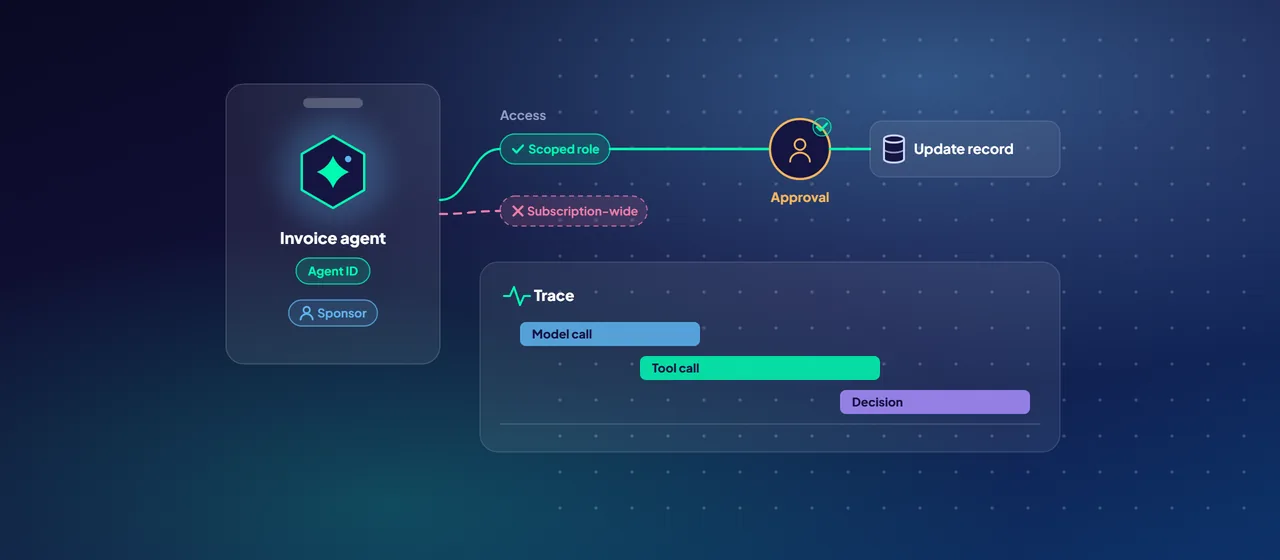
You can't govern what you can't identify. Microsoft Entra Agent ID, which Microsoft states is now generally available, gives AI agents their own identity type in Microsoft Entra ID, separate from users and from ordinary application identities. Its sign-in and audit logs record agent activity as agent activity, so you can tell what an agent did from what a person did.
The key concepts:
- Agent identity. The account the agent uses to request access tokens and reach resources.
- Agent identity blueprint. A template for a kind of agent. Policies applied to a blueprint cover every agent identity created from it, and disabling a blueprint blocks all of them at once.
- Sponsor. The person accountable for the agent's purpose and lifecycle. If a sponsor leaves, sponsorship can transfer automatically to their manager, so no agent is left without an owner.
- Agent's user account. An optional user object for agents that need a mailbox or a Teams presence. Microsoft advises creating these only when truly needed.
The platforms already use it. Microsoft Foundry gives agents in development a shared project identity and gives each published agent a distinct identity of its own. Automatic agent identities for Copilot Studio agents are in preview. The Microsoft Entra admin center lists all agent identities in the tenant in one place.
On licensing: Agent ID itself is available to all Microsoft Entra customers. Extending Entra security features to agents, such as Conditional Access, ID Protection and governance, requires Microsoft Agent 365, which became generally available for commercial customers on May 1, 2026.
Permissions and least privilege
Agents tend to collect permissions, because broad access makes the demo work. Resist that from the first build.
- Match the access pattern to the scenario. When a user is present, let the agent act on that user's behalf, so it can only reach what the user can. Use the agent's own permissions only for genuinely autonomous work, and avoid application permissions where delegated ones would do.
- Scope narrowly. Grant roles on a specific resource, not a whole subscription. In Foundry, assign Azure roles to the published agent's own identity. Its role assignments don't carry over from the shared project identity, which Microsoft describes as having a broader blast radius.
- Avoid stored secrets. Microsoft recommends managed identities or certificates for production agents, with client secrets only in development.
- Watch for API keys. Conditional Access only protects resources secured by Microsoft Entra ID. An agent calling a service with an API key bypasses it completely.
- Make access expire. Access packages in Microsoft Entra ID Governance can grant agents time-bound access through an approval workflow, and notify the sponsor before it expires.
Conditional Access then decides when access is granted. Agents can't complete interactive controls such as multifactor authentication, so Microsoft recommends separate policies for agents rather than relying on user policies. Useful starting points are a policy that blocks agents ID Protection flags as high risk, and policies applied at blueprint level or targeted with custom security attributes, such as blocking non-production agents from production resources. Conditional Access for agents requires Microsoft Entra ID P1 or P2 and an Agent 365 license.
Monitoring: know what agents did
Monitoring for agents spans identity, application and data layers:
- Identity. Microsoft Entra ID Protection for agents flags risky behavior such as sign-in spikes, access to unfamiliar resources and failed access attempts. Admins can confirm a compromise, which sets the risk level to high and triggers risk-based Conditional Access policies.
- Application. Foundry tracing, built on OpenTelemetry and Azure Monitor Application Insights, records model calls, tool calls and agent decisions. Dashboards track tokens, latency, errors and quality scores, and alerts can fire when outputs fail quality thresholds.
- Data. For Agent 365 agents, Microsoft Purview audits interactions between agents, people and tools, and supports data loss prevention, retention and eDiscovery. Its AI observability page in Data Security Posture Management lists active agents ranked by risk.
- Threats. With Agent 365, Microsoft Defender discovers agents, assesses their security posture and detects threats. For Copilot Studio agents, real-time protection scans tool calls as they happen and blocks suspicious actions, including cross-prompt injection attacks.
Decide who reviews each signal. A log nobody reads is not a control.
Content safety: guard inputs, outputs and tool calls
Guardrails in Microsoft Foundry check content at several points. For agents, they can check the user's input, the tool call the agent proposes, the tool's response and the final output. Tool call and tool response checks are in preview, as are agent guardrails overall. Controls cover hate, sexual, violent and self-harm content, prompt attacks (jailbreaks), indirect attacks hidden in documents or tool output, protected material, personal information (preview) and task adherence (preview).
Two details matter for agents. An agent's guardrail fully overrides the guardrail of its underlying model, so review it on its own. And some preview controls, including groundedness, don't yet apply to agents.
Treat everything a tool returns as untrusted. Microsoft's guidance for MCP servers, which connect agents to external tools, is to allow-list the specific tools an agent may use and to treat tool descriptions and results as possible carriers of hidden instructions.
An approval process for agents
Approval works at two levels: before an agent goes live, and before it takes a risky action.
At runtime, both platforms support a human checkpoint. In Foundry, an MCP tool can be set to require approval before every call. In Copilot Studio, a tool can ask the user for confirmation before it runs. Use these for anything that writes data, sends messages or moves money.
Before go-live, a lightweight lifecycle process covers most needs:
- Intake. Record the agent's purpose, sponsor, users, data sources and actions.
- Risk tier. Classify by what the agent can change and what data it can see. Read-only internal agents get a lighter path than agents that act in customer-facing systems.
- Identity and access review. An identity admin confirms the blueprint, sponsor, permissions and Conditional Access policies. Microsoft recommends this as a production handshake.
- Safety testing. Run evaluations and adversarial tests against agreed thresholds, and review the guardrail configuration.
- Go-live sign-off. The sponsor and the risk owner approve, with monitoring and alert owners named.
- Periodic review. Microsoft suggests sponsors attest every 6 to 12 months that each agent is still needed. Decommission agents that aren't.
- 1Intake
Record purpose, sponsor, users, data sources and actions.
- 2Risk tier
Classify by what the agent can change and what data it can see.
- 3Access review
An identity admin confirms blueprint, sponsor, permissions and Conditional Access.
- 4Safety testing
Evaluations and adversarial tests against agreed thresholds.
- 5Go-live sign-off
Sponsor and risk owner approve, with alert owners named.
- 6Periodic review
Sponsors attest every 6 to 12 months. Unneeded agents are decommissioned.
Where to start
Start with an inventory. List the agents already in your tenant, assign a sponsor to each, and review the permissions of the three with the widest access. That exercise usually shows which controls to put in first. CloudGate runs agent governance assessments that produce this inventory and a prioritized control plan.
Talk to an architect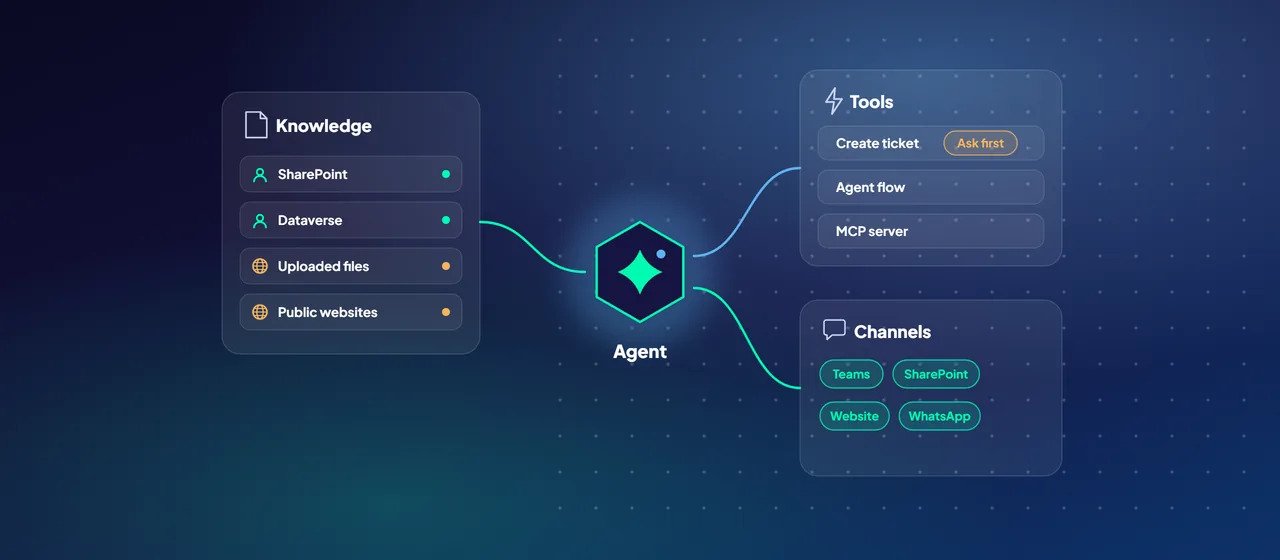
![A question goes to a search index, which retrieves passages the user may read while a finance passage is trimmed as no access; the answer cites its sources as [1] and [2].](/images/v2/blog/grounded-ai-assistants-rag-1280.webp)