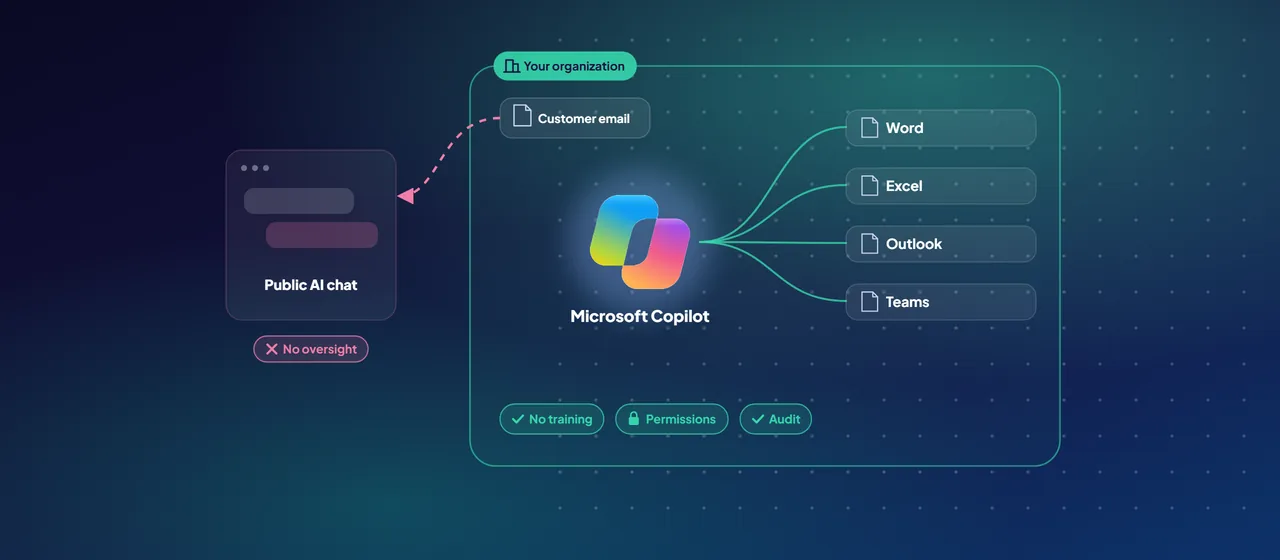
Your staff are already using AI. Someone pastes a customer email into a free chatbot to draft a reply. A finance analyst uploads a spreadsheet to get a quick summary. Nobody in IT approved either tool, and nobody knows where that data went.
Banning AI rarely works, because people find a way around the ban. The more useful questions are these: which AI tools should your people use, what happens to your data when they do, and how do you see and control that use? This post compares Microsoft Copilot with public AI tools on those points, then sets out how to govern the rest.
The real risk of shadow AI
Shadow AI means employees using AI apps that the organization hasn't approved, monitored or governed. The intent is usually good. The risk is in the data. Contracts, customer records and financial figures end up in services your security team has never reviewed, sometimes under consumer terms that let the provider keep prompts or use them to improve its models.
For regulated organizations, that creates problems you can't fix later. You can't show a regulator where the data went. You can't apply retention or eDiscovery to it. You can't take it back.
What Copilot does differently with your data
Microsoft Copilot works inside the apps people already use: Word, Excel, PowerPoint, Outlook and Teams. For IT, the difference that matters is not the interface. It is the commitments behind it. According to Microsoft's documentation:
- No training on your data. Prompts, responses and data accessed through Microsoft Graph aren't used to train foundation models.
- Existing permissions apply. Copilot only surfaces organizational data that the user has at least view permission to. The Semantic Index, Copilot's search index over your content, honors the same identity-based access boundary.
- Sensitivity labels are honored. If Microsoft Purview Information Protection encrypts a file, Copilot respects the usage rights granted to that user.
- Interactions are recorded. Prompts and responses are stored in line with your other Microsoft 365 content, so admins can search them, audit them and apply Microsoft Purview retention policies.
- Compliance commitments carry over. Copilot is covered by existing Microsoft 365 commitments, including GDPR and, for EU customers, the EU Data Boundary. Microsoft added Copilot to the data residency commitments in its Product Terms in March 2024.
Copilot also includes protections against harmful content and against prompt injection (jailbreak) attempts. Microsoft is clear that generated answers aren't guaranteed to be factual, so people still need to review what Copilot produces.
Copilot Chat versus the full Copilot license
Two products are often confused.
Microsoft Copilot Chat is a chat experience for users signed in with their work account. It includes enterprise data protection at no extra cost: prompts and responses are processed within the Microsoft 365 service boundary, logged for audit and eDiscovery, and not used to train models. A green shield in the interface shows that protection applies. Copilot Chat is grounded in the web, not in your files, email or chats. Users can still bring work content in by uploading a file, pasting text, using Copilot Chat in Outlook, or using an agent that has access to organizational content.
Microsoft Copilot, the paid license, adds grounding in your organizational data through Microsoft Graph. It can reason over the email, meetings, chats and documents a user can access, and it works inside the Office apps.
For many organizations, Copilot Chat is the fastest way to give everyone a sanctioned alternative to public chatbots. The paid license then goes to the roles where grounding in work data pays off.
One detail to know: when web search is on, Copilot generates short search queries and sends them to Bing. Microsoft states that these queries don't include user or tenant identifiers or the full prompt. Bing handles them under separate terms, however, and they aren't covered by the EU Data Boundary. Admins can turn web search off.
- Work account sign-in, enterprise data protection at no extra cost
- Grounded in the web, not your files, email or chats
- Work content comes in by upload, paste or an agent
- Grounded in organizational data through Microsoft Graph
- Email, meetings, chats and documents the user can access
- Works inside the Office apps
Copilot will find what your permissions expose
Because Copilot respects permissions, it also reveals where permissions are too loose. A salary spreadsheet shared with the whole organization years ago suddenly becomes easy to find. Fix oversharing before a broad rollout, not after.
Microsoft Purview Data Security Posture Management (DSPM) for AI helps here. It runs a weekly data risk assessment on your 100 most-used SharePoint sites and flags content shared with anyone or shared externally. It then offers fixes: auto-labeling policies, data loss prevention (DLP) policies that stop Copilot from summarizing labeled content, and SharePoint Restricted Content Discovery to keep chosen sites out of Copilot. Microsoft is now moving customers to a newer Data Security Posture Management experience that extends these capabilities to more AI apps and agents.
A practical checklist for governing AI
A sanctioned tool only helps if you also manage the unsanctioned ones. A workable sequence:
- Discover. In Microsoft Defender for Cloud Apps, filter the cloud app catalog by the Generative AI category to see which AI apps are in use and how risky each one is.
- Decide. Agree which AI apps are approved, for whom and for what kinds of data. Keep the list short and publish it.
- Block or warn. Mark unapproved apps as Unsanctioned. On devices onboarded to Microsoft Defender for Endpoint, they are blocked automatically, or you can choose to warn and educate users instead.
- Protect data in prompts. Use the one-click policies in DSPM for AI to detect sensitive information sent to third-party AI sites. This needs the Purview browser extension and devices onboarded to Microsoft Purview.
- Fix oversharing. Run the data risk assessments, label sensitive content and tighten sharing links before you expand Copilot.
- Set retention and audit. Apply retention policies to Copilot interactions and confirm that auditing is on.
- Train people. Explain what's approved and why, and how to check AI output before they send it.
Is Copilot right for your organization?
Copilot is the natural choice when you already run on Microsoft 365, handle confidential or regulated data, and need to show auditors how AI use is controlled.
It is less compelling if your content is badly organized or widely overshared and you aren't ready to fix that. Copilot reflects the state of your data back at you, good or bad.
Licensing is a decision in its own right. A common pattern is Copilot Chat for everyone, and paid licenses for roles with a clear use case, such as people who spend most of their day in email, meetings and documents.
Where to start
Begin with a short readiness assessment. Find out which AI apps are in use today, run an oversharing assessment on your busiest SharePoint sites, and choose one or two teams for a Copilot pilot with agreed success measures. CloudGate runs Copilot readiness assessments and pilots for organizations that want help with this.
Talk to an architect