Microsoft Fabric makes it easy to start. Anyone with access can create a workspace, add a lakehouse and publish a report in an afternoon. Six months later, many organizations find dozens of workspaces, copies of the same source data in several of them, reports built on personal models, and no clear answer to who owns what.
A data landing zone prevents that. It is the agreed structure every Fabric project lands in: how workspaces are organized, how data moves from raw to curated, how it is governed, and how changes reach production. This post describes a blueprint that works for regulated organizations, based on Microsoft's own guidance.
Workspaces, domains and capacities
Workspaces are the unit of access control, Git integration and deployment in Fabric, so the workspace design drives everything else.
- One workspace per medallion layer. Microsoft recommends putting each layer's lakehouse in its own workspace, which gives you separate access control and governance for raw, cleansed and curated data.
- Separate development and production. Pair each workspace with a development (and ideally test) equivalent, so changes are built and checked before they touch production.
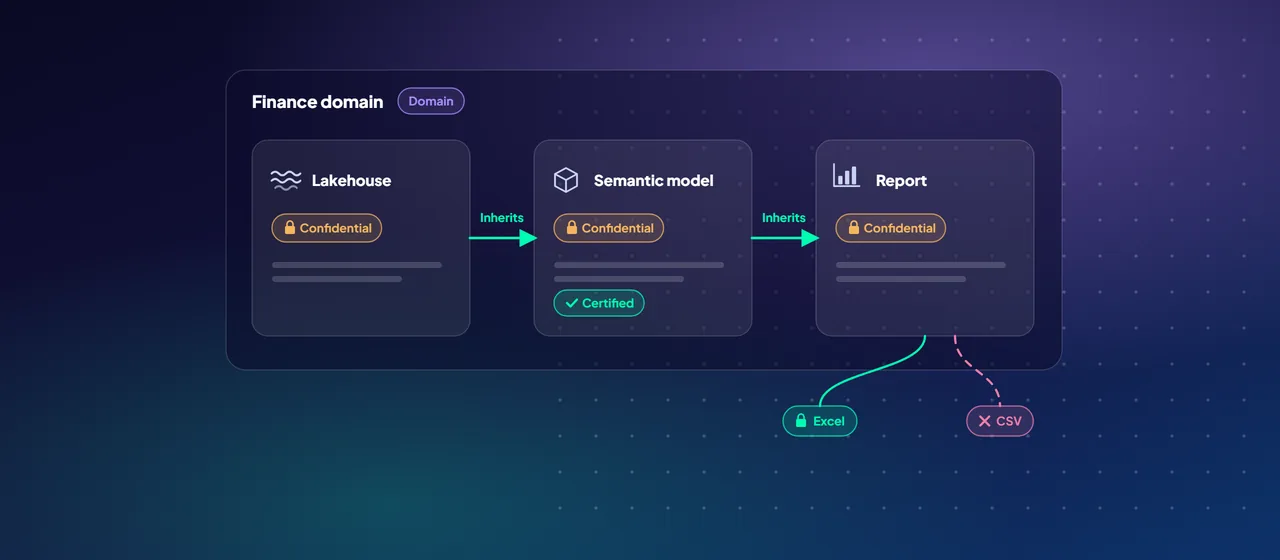
- Group by domain. Fabric domains group workspaces by business area, such as finance, operations or HR. This supports a data mesh approach, where each domain owns its data products.
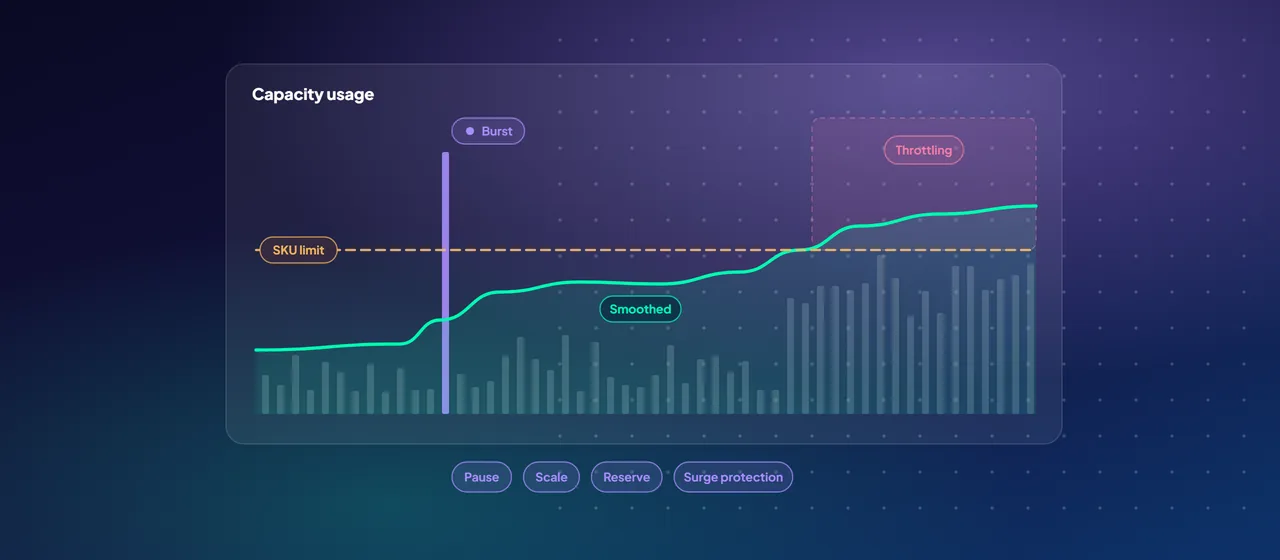
- Plan capacities deliberately. Workspaces are assigned to capacities, and all items in a capacity share its compute. A common pattern is to keep production reporting on its own capacity, so that a heavy development job cannot slow down executive dashboards.
Bronze, silver and gold
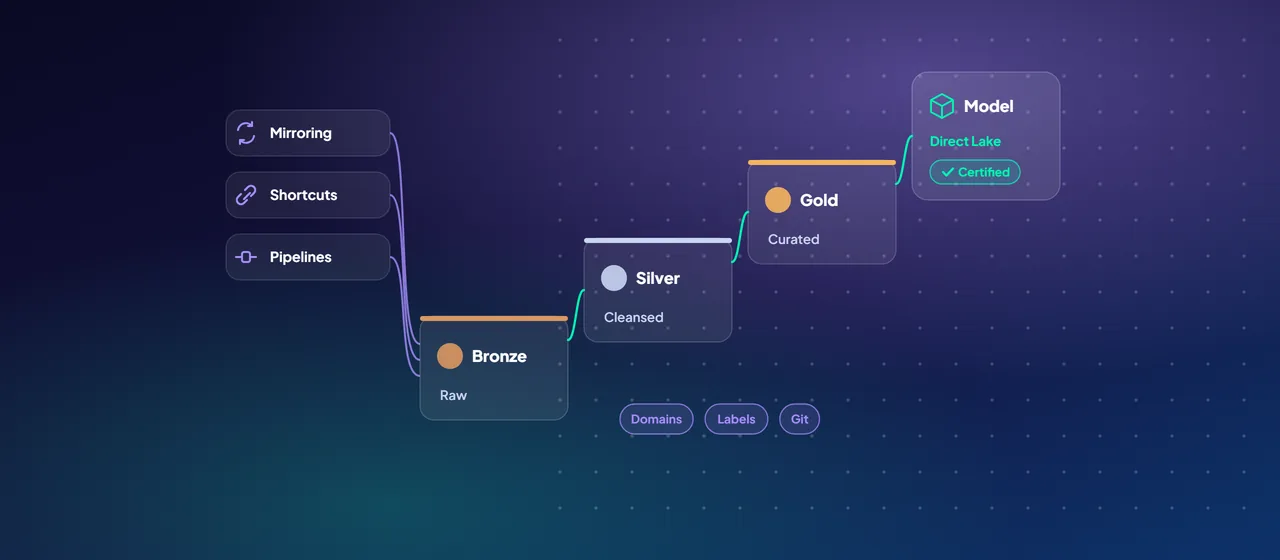
The medallion architecture is Microsoft's recommended design pattern for Fabric. It organizes data into three layers of increasing quality:
- Bronze (raw). Data exactly as it arrives, unchanged, kept as the source of truth. Microsoft recommends keeping the original format where possible, or Delta or Parquet.
- Silver (enriched). Errors fixed, formats standardized, duplicates removed, records matched across systems.
- Gold (curated). Tables shaped for reporting and analysis, typically as star schemas.
Use Delta tables in silver and gold. Microsoft describes two deployment patterns: lakehouses for all three layers, or lakehouses for bronze and silver with a Fabric Data Warehouse for gold. The second suits teams whose curation logic is mostly T-SQL.
Materialized lake views let you define silver and gold transformations as SQL statements, with Fabric working out the refresh order and applying data quality rules, instead of hand-building pipelines between layers.
Getting data in: mirroring, shortcuts and pipelines
The landing zone should state which ingestion method to use for which kind of source, so teams stop inventing their own:
- Mirroring for operational databases. Azure SQL Database, SQL Server, Oracle, Snowflake, Azure Cosmos DB, Azure Database for PostgreSQL and others can be continuously replicated into OneLake as Delta tables, without ETL pipelines. Replication compute is free, and each capacity unit includes 1 TB of mirroring storage.
- Shortcuts for data already in a lake. If data sits in Azure Data Lake Storage Gen2, Amazon S3, Google Cloud Storage or another Fabric item, Microsoft recommends a shortcut in the bronze layer rather than copying it.
- Pipelines and Dataflow Gen2 for everything else, such as SaaS APIs, files and sources that cannot be mirrored.
Treat mirrored databases as bronze. Shortcut their tables into the silver workspace and transform from there, so raw replicas stay untouched.
Continuous replication into OneLake as Delta tables, without ETL pipelines.
Point to ADLS Gen2, Amazon S3, Google Cloud Storage or another Fabric item instead of copying.
Pipelines and Dataflow Gen2 for SaaS APIs, files and sources that can't be mirrored.
Governance with Microsoft Purview
Governance works best when it is part of the landing zone from day one, not a later project. Fabric integrates with Microsoft Purview in several ways:
- Microsoft Purview Unified Catalog shows metadata about Fabric items, so data can be discovered, described with glossary terms and published as data products.
- Sensitivity labels from Microsoft Purview Information Protection can be applied to all Fabric items, and protection policies can control access based on those labels.
- Data loss prevention (DLP) policies can detect sensitive data uploaded to OneLake and restrict access to sensitive assets in warehouses, SQL databases and KQL databases.
- Microsoft Purview Audit records all Fabric user activity.
Inside Fabric, the OneLake catalog has a Govern tab that shows the governance state of your data and recommends actions. Decide in the landing zone design which labels are mandatory for gold data, who can create workspaces, and who approves new domains.
Semantic models and Direct Lake
The gold layer exists to be consumed, usually through Power BI semantic models, the layer that defines relationships, measures and security.
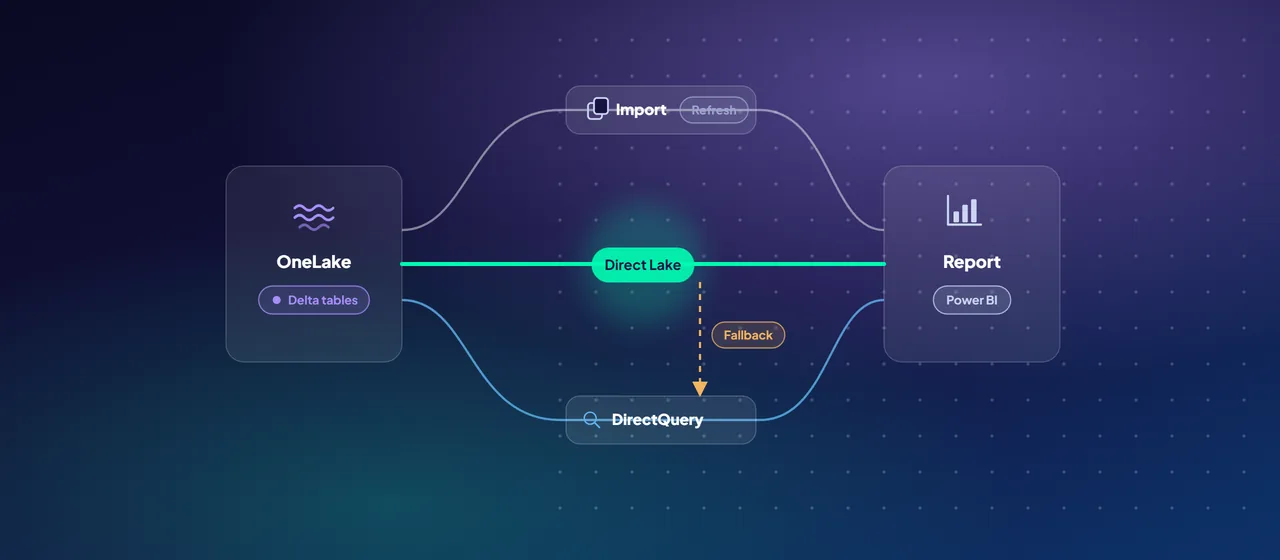
Microsoft positions Direct Lake as a strong fit for the gold layer. Direct Lake models read Delta tables from OneLake directly into memory, so they avoid scheduled import refreshes while keeping import-like query performance. A few design rules follow:
- Build shared, certified semantic models on gold tables, and have reports connect to them, instead of each report carrying its own model.
- Keep gold tables well maintained (optimized file sizes, limited small files), because each capacity size sets guardrails on how many rows and files Direct Lake will load per table.
- Choose between Direct Lake on OneLake, which can span several Fabric sources and does not fall back to DirectQuery, and Direct Lake on SQL, which can fall back to DirectQuery when it cannot read a table directly.
- Apply row-level security in the semantic model, and use a fixed-identity connection, as Microsoft recommends.
CI/CD with Git integration
A landing zone without source control drifts. Fabric Git integration connects a workspace to a branch in Azure DevOps, GitHub or GitHub Enterprise (cloud versions only). Lakehouses, notebooks, pipelines, warehouses, mirrored databases and many other items can be committed, reviewed and reverted like code. Git support for semantic models and reports is still in preview, so check the current supported items list before relying on it.
Deployment pipelines then promote content between stages, typically development, test and production, with between two and ten stages. They can also be automated through REST APIs, for example from an Azure DevOps pipeline.
A workable pattern: developers work in feature branches connected to their own workspaces, merge to the main branch through pull requests, and deployment pipelines promote the result to test and production.
Landing zone checklist
- Domains defined, with a named owner for each.
- Workspace naming and layer structure agreed, with development and production separated.
- Capacity plan that isolates production reporting.
- Ingestion rules: when to mirror, shortcut or build a pipeline.
- Sensitivity labels and DLP policies applied to Fabric.
- Certified semantic models on gold, using Direct Lake where tables fit the guardrails.
- Every workspace connected to Git, and deployment pipelines for promotion.
Where to start
Start with a design workshop that agrees domains, workspace structure and governance rules, then build the landing zone with a single source, such as one mirrored database flowing through bronze, silver and gold to one certified semantic model. That first path becomes the template for every project after it. CloudGate designs and builds Fabric landing zones on this model.
Talk to an architect