Once an application is in containers, the next question is where to run them. On Azure, the two serious candidates for most enterprise workloads are Azure Kubernetes Service (AKS) and Azure Container Apps. Both run on Kubernetes. Both scale, both integrate with virtual networks, both can run microservices. So teams often pick by habit: "we're a Kubernetes shop" or "we don't want Kubernetes".
That is the wrong way to decide. The real difference is how much of the platform you want to own. This post compares the two on the points that matter in production, then gives a short checklist to apply per workload.
The core difference: who runs the platform
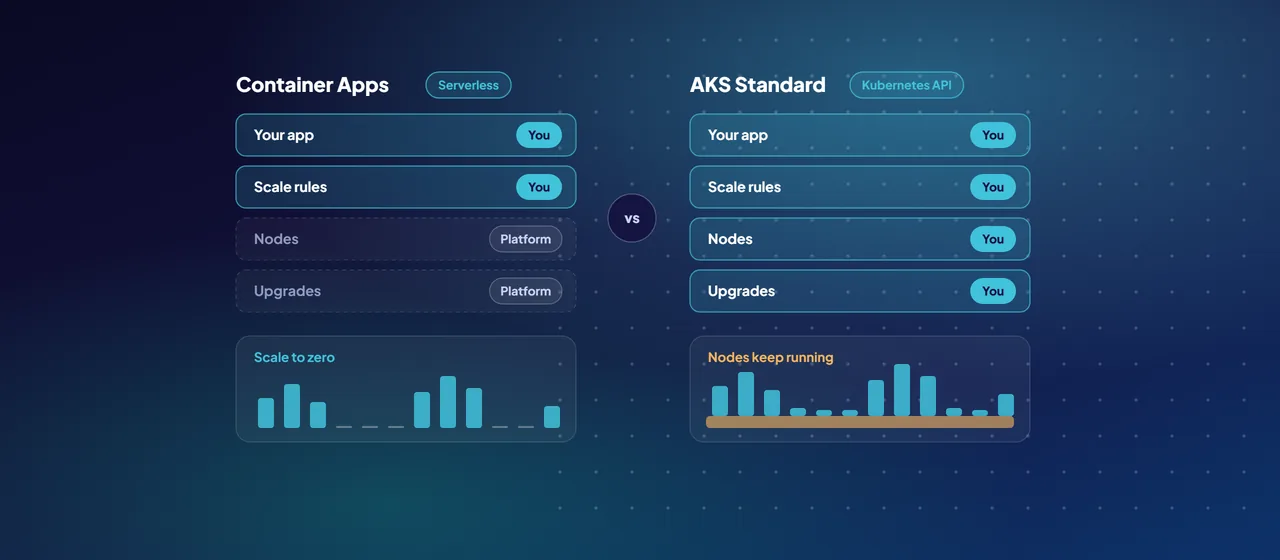
Azure Container Apps is a serverless container platform. Microsoft describes it as powered by Kubernetes and open-source projects such as KEDA, Dapr and Envoy, but it doesn't give you direct access to the Kubernetes APIs. You deploy container apps into an environment (a secure boundary with its own virtual network), and the platform handles the cluster, the nodes and the upgrades. You get revisions, traffic splitting, service discovery, scheduled and event-driven jobs, and scale to zero.
AKS is managed Kubernetes. You get the full Kubernetes API and can run any Kubernetes workload, including operators, custom resources and third-party tooling from the wider ecosystem. It now comes in two modes:
- AKS Standard: you create and configure the cluster, choose networking, node pools and add-ons, and decide how upgrades happen.
- AKS Automatic: Azure preconfigures the cluster following AKS best practices. Node provisioning, scaling, automatic upgrades, node repair, workload identity and deployment safeguards are set up for you, and Microsoft recommends it as the default for most production AKS workloads. You still have the Kubernetes API, so you still own what you deploy into it.
Microsoft's own summary is useful: if you need the Kubernetes APIs and control plane, use AKS; if you want Kubernetes-style apps without managing the cluster, Container Apps gives you a fully managed experience, and many teams start there.
- You deploy apps into an environment
- The platform runs the cluster, nodes and upgrades
- No direct Kubernetes API access
- Azure preconfigures node provisioning, scaling, upgrades and repair
- Full Kubernetes API
- You own what you deploy into it
- You configure the cluster, networking, node pools and add-ons
- You decide how upgrades happen
- Full Kubernetes API
Scaling: KEDA on both sides
Both platforms use KEDA (Kubernetes Event-driven Autoscaling), an open-source project that scales workloads on events such as queue length, including down to zero.
- In Container Apps, KEDA is built in. You declare scale rules (HTTP concurrency, TCP connections, or custom rules based on any KEDA scaler, such as Azure Service Bus or Event Hubs) and minimum and maximum replicas. Replicas default to a range of 0 to 10 and can be set up to 1,000. Scale rules can authenticate with managed identity. Vertical scaling isn't supported.
- In AKS, KEDA is preconfigured in AKS Automatic and available as a managed add-on in AKS Standard. You also have the Horizontal Pod Autoscaler, Vertical Pod Autoscaler, and node-level scaling through the cluster autoscaler or node autoprovisioning. More levers, and more to tune.
If your workloads are event-driven and sit idle for long periods, both can scale pods to zero. Container Apps' Consumption plan turns that directly into zero usage charges; on AKS you still pay for whatever nodes remain running.
Networking and Dapr
Networking: environments versus clusters
Container Apps networking is set at the environment level. The default workload profiles environment supports your own virtual network, internal-only environments behind an Azure internal load balancer, private endpoints, user-defined routes to send egress through Azure Firewall, and Azure NAT Gateway. It needs a dedicated subnet (minimum /27). Two cautions: you can't change the network type after the environment is created, and the older Consumption-only environment type doesn't support user-defined routes or NAT Gateway, so avoid it for regulated workloads.
AKS gives you every networking choice Kubernetes offers, and asks you to make them. You pick an overlay or flat network model (Azure CNI Overlay, Azure CNI with a pod subnet, or Azure CNI powered by Cilium), an outbound type, an ingress approach (the application routing add-on, the Istio-based service mesh add-on, or your own), and network policies between pods. AKS Automatic defaults to Azure CNI Overlay powered by Cilium, managed ingress through the application routing add-on, and a managed NAT gateway. If your security team needs fine-grained pod-to-pod policy or a service mesh, AKS is the natural fit.
Dapr: managed or self-run
Dapr (Distributed Application Runtime) gives microservices building blocks for service invocation, pub/sub, state, bindings, actors, secrets and configuration through a sidecar, so code stays portable.
- Container Apps offers Dapr as a managed feature. You enable it per app and configure components; Microsoft runs and versions the runtime. The building block APIs listed above are generally available, but only a supported subset of Dapr components works, Dapr isn't available for Container Apps jobs, and apps using Dapr actors can't scale to zero.
- AKS supports Dapr through the Dapr extension, which installs the Dapr control plane on the cluster. Microsoft advises against auto-upgrade in production and notes that keeping to a supported Dapr version is your operational responsibility.
Cost model
The billing models differ in shape, not just price.
- Container Apps, Consumption plan: billed per second for vCPU and memory allocated to running replicas, plus HTTP requests. Each subscription gets a monthly free grant, and apps scaled to zero incur no usage charges. Replicas held at a minimum count can drop to a lower idle rate.
- Container Apps, Dedicated plan: billed per workload profile instance plus a plan management fee, suited to steady capacity.
- AKS: you pay for the nodes (virtual machines, disks, networking) whether or not pods are busy. Cluster management is free in the Free tier, which has no financially backed uptime SLA and is meant for dev and test. The Standard tier adds a financially backed uptime SLA for production; Premium adds long-term support for Kubernetes versions. AKS Automatic uses the Standard tier.
Azure savings plan for compute covers Container Apps and the virtual machines behind AKS nodes. For spiky or low-traffic services, Container Apps is usually simpler to keep cheap. A well-packed AKS cluster can run dense, steady workloads efficiently, if someone watches utilization.
Team skills and a decision checklist
The deciding factor is often people. AKS rewards teams that know Kubernetes manifests, Helm, network policies and upgrade planning, and can staff platform on-call. Container Apps suits teams that want to ship services and leave the platform to Microsoft. AKS Automatic narrows the gap, but it doesn't remove the need for Kubernetes skills.
Run each workload through these questions:
- Do you need the Kubernetes API? Operators, custom resources, Helm charts from vendors or specific ecosystem tools point to AKS.
- Do you have, or plan to build, a platform team with Kubernetes skills? If not, start with Container Apps.
- Is the workload event-driven or idle much of the time? Container Apps' scale-to-zero billing is hard to beat.
- Do you need a service mesh, pod-level network policy or a custom CNI? Choose AKS.
- Do you need Windows containers or privileged containers? Container Apps requires Linux (linux/amd64) images and doesn't allow privileged containers. AKS supports Windows Server node pools.
- Do you want managed Dapr? Container Apps runs it for you; on AKS you run the extension.
- Is predictable, dense, always-on capacity the priority? AKS, or a Container Apps Dedicated plan.
Using both is common: Container Apps for most APIs and jobs, AKS where Kubernetes itself is needed.
Where to start
Start with a short workload review rather than a platform decision. Take three representative services, answer the checklist for each, and deploy the simplest candidate to Azure Container Apps in an internal environment inside your landing zone. Move to AKS, and consider AKS Automatic first, only for workloads the checklist sends there. CloudGate runs these container platform assessments and pilots if you want a partner alongside your team.
Talk to an architect